Showing posts with label amazon web services. Show all posts

Tuesday, 22 June 2010

Managing code and configuration synchronisation in an IIS web farm


This post has moved to http://wishfulcode.com/2010/06/22/managing-code-and-configuration-synchronisation-in-an-iis-web-farm/

When we think about version control, the most common purpose we associate with it is source code.

When we think about maintaining a farm of web servers, the initial problems to focus on solving are:

  1. Synchronisation – different nodes in the farm should not (unless explicitly told to) have different configuration or serve different content.
  2. Horizontal Scalability – I want to be able to add as many servers as required, without needing to spend time setting them up or without new builds taking more time to deploy.
  3. Reliability – no single point of failure (although this has varying levels – inability to run a new deployment is less severe than inability to serve content to users).
The scenario begs for a solution involving some kind of repository both of content (ie: runtime code) and configuration (ie: IIS setup), and most sensibly one that asks the member servers in the farm to pull content and configuration from an authoritative source, rather than having to maintain a list of servers to sequentially push to.

Synchronising Content

This sounds very similar to the feature set of many Distributed Version Control Systems. Thanks to James Freiwirth's investigation and code (and persistence!), we started with a set of commands in a script that would instruct a folder to fetch the latest revision of a set of files under Git version control and update to that revision. So now we could have multiple servers pulling from a central Git repository on another server and maintaining the same version between themselves. What's more, by using Git the following features are gained:

  • It's index-based – Git will fetch a revision and store it in its index before applying that revision to the working dir. That means, even on a slow connection, applying changes is very quick – no more half-changed working directory whilst waiting for large files to transfer. FTP, I'm talking to you!
  • It's optimised – Git will only fetch change deltas, and it's also very good at detecting repeated content in multiple files.
  • It's distributed – All the history of your runtime code folder will be maintained on each server. If you lose the remote source of the repositories, not only will you not lose the data because the entire history is maintained on each node, you will still be able to push, pull, commit and roll-back between the remaining repositories.
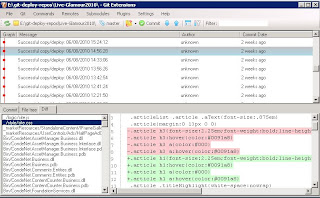
So you could commit from anywhere to your deployment Git repository, and have all servers in your web farm pick up these changes. And then you instantly gain revision control for all deployments. If you are manually copying files to your deployment environment and, now, to the origin of your repository (some environments can't help this - shock!) you never have to worry about overwriting files you'll later regret, and you're able to see exactly what's changed and when in your server environment. Or, if you have a build server producing your website's runtime code like us, then you can script the build output to be committed to your git (using NANT for example). James is a member of my development team, and he really changed the way we think about DVCS by introducing us to Git quite early on.


Synchronising IIS

Maintaining web server configuration across all servers is just as important as being able to synchronise content. In the past, options were limited. With IIS7 we gain the ability to store a very semantic and realtime representation of IIS configuration on any file path with the Shared Configuration feature. If we can somehow still store this information locally, but have it synchronised across all the servers then we are satisfying all 3 requirements for synchronisation, scalability and reliability.

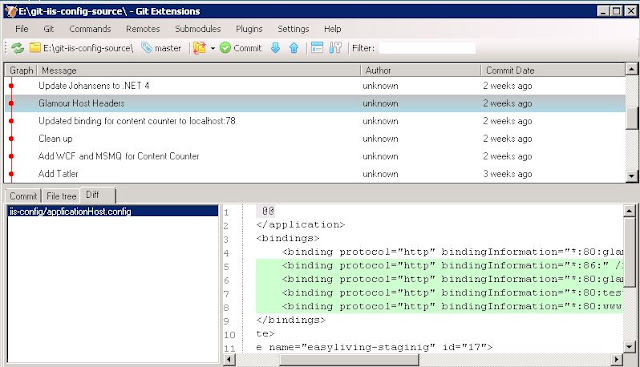
To accomplish this, we can use the exact same method for synchronising IIS configuration that we use for content. We can set up a git repository, put in the IIS configuration, pull this down to each server and instruct each server's IIS to point to the working copy of the revision control repository. Then, we now have history, comments and rollback ability for IIS configuration. Being able to see each IIS configuration change difference is alone an incredibly invaluable feature for our multi-site environment.


Practical setup (on Amazon EC2)

The final task to accomplish is to identify what process runs on all the servers to keep them always pulling the latest version of both the content and the configuration. The best we've used so far is simple Windows 2008 Task Scheduler powershell scripts, which James gives examples of. However, these scripts themselves can change over time since they need to know which repositories to synchronise. This calls for yet another revision controlled repository. The scheduled tasks on the servers themselves are only running stub files which define a key, to identify which farm, and therefore which sites a server needs, and then runs another powershell script retrieved from a central git repository which ensures the correct content repositories for that farm are created and up to date.

The end result is a completely autonomous (for their runtime) set of web servers, which call to central repositories in order to seek updated content and configuration.

If we then create a virtualised image with a Scheduled Task running the stub powershell script, we have the ability at any time to increase the capacity of a server farm simply by starting new servers and pointing the traffic at them. These new servers will each pull in the latest configuration and content.

Why not use the MS Web Deploy Tool?

Microsoft's Road Map for IIS and ASP.Net includes interesting projects concerning deployment and server farm management. The Web Deploy tools is impressive in that in can synchronise IIS configuration and content (and some other server setup) even between IIS versions. However, it is very package based. We'd still need a system to either pull the latest version package down to each local server and perform a deployment of the package, or remotely push to every server we know about. This essentially starts us back at the same step I defined at the beginning of this post – needing a way to maintain a farm of servers and building something to manage the execution of those packages. There are scenarios where I do use this tool, and I'm sure that this and other tools will evolve to the point where we can get as much control and flexibility as we can achieve with 'git-deploy' quite soon.

Tuesday, 29 December 2009

S3ToConfig: Loading configuration for a .NET app from a remote source

This post has moved to http://wishfulcode.com/2009/12/29/s3toconfig-loading-configuration-for-a-net-app-from-a-remote-source/

It would be great if the configuration section framework built in to .NET was not hard-coded to be FileSystem-based, but could be loaded, via a provider-framework, from any data source.

Whilst the framework was not built like this, this article explains how the encryption mechanism for configuration sections is provider-based and can be used to load data from sources other than files (a SQL Database in the article's case). In our desire to have a farm of apps running without a difficult deployment process for configuration updates (both for server services, asp.net sites, and client tools), we wanted to deploy a number of apps but keep the configuration files on shared storage. And since our environment is completely inside Amazon EC2, it made sense to keep the configuration centrally on the redundant and scalable storage system already provided, Amazon S3.

It's actually a very simple process to have an application load configuration remotely from S3. The main app.config file needs to be on the local filesystem with the executable, but each configuration section (built-in or custom), even the AppSettings section, can be fetched from S3 on startup, by defining a custom encryption provider and putting the settings for the provider as the fake 'encrypted data'.

You can view the code or download the released verion for loading configuration remotely from S3 on CodePlex, here.

An example of how to use it is:
  1. Add the Natol.S3ToConfig.ProtectedConfiguration.dll file to your projects bin folder, or the GAC on the machine
  2. Define the custom configuration provider in your app.config or web.config after the configSections element:
    <configprotecteddata defaultprovider="s3ConfigSectionProvider">
    <providers><add name="s3ConfigSectionProvider" type="Natol.S3ToConfig.ProtectedConfiguration.ProtectedConfigurationProvider, Natol.S3ToConfig.ProtectedConfiguration"></add>
    </providers></configprotecteddata>
    

  3. Add a file to Amazon S3 at your desired location, giving it a key that represents the function of both your app and the context it runs in (remembering amazon s3 bucket names are globally unique). In this file, put the contents of your configuration section, eg:
    <sampleconfig><settings sampleconfigsetting="This Setting came from s3"></settings></sampleconfig>
    

  4. Replace the contents of your static configuration section with an EncyptedData element containing the location of your new configuration object in Amazon S3 and let it know our custom provider should handle the 'decryption', eg:
    <sampleconfig configprotectionprovider="s3ConfigSectionProvider"> <encrypteddata> <s3providerinfo s3accesskey="REPLACE_WITH_YOUR_VALUE" s3secretkey="REPLACE_WITH_YOUR_VALUE" s3bucketname="REPLACE_WITH_YOUR_VALUE" objectkey="test-s3toconfig-sampleconsoleapplication-sampleconfig"></s3providerinfo> </encrypteddata></sampleconfig>
    

  5. That's it. Your configuration section will work exactly as normal, even calling ConfigurationManager.RefreshSection() which will then reload from S3... :-) Seriously - try the demo
Future Possibilities
It would be nice to support notification of when the configuration is updated, in the same way that the .NET Framework monitors the FileSystem-based .config files.
It would also be great to support writing back to the remote data store if the configuration has changed, depending on the per